Create the DeltaTwin® workflow
In the context of DeltaTwin®, the worfklow file (workflow.yml) defines how different parts of the DeltaTwin® (models) work together to achieve the desired outcome. In the case of the rotation scenario, we distinguish 3 main elements:
- the inputs
- the model used for rotation
- the output (resulting image)
We want to describe this workflow:
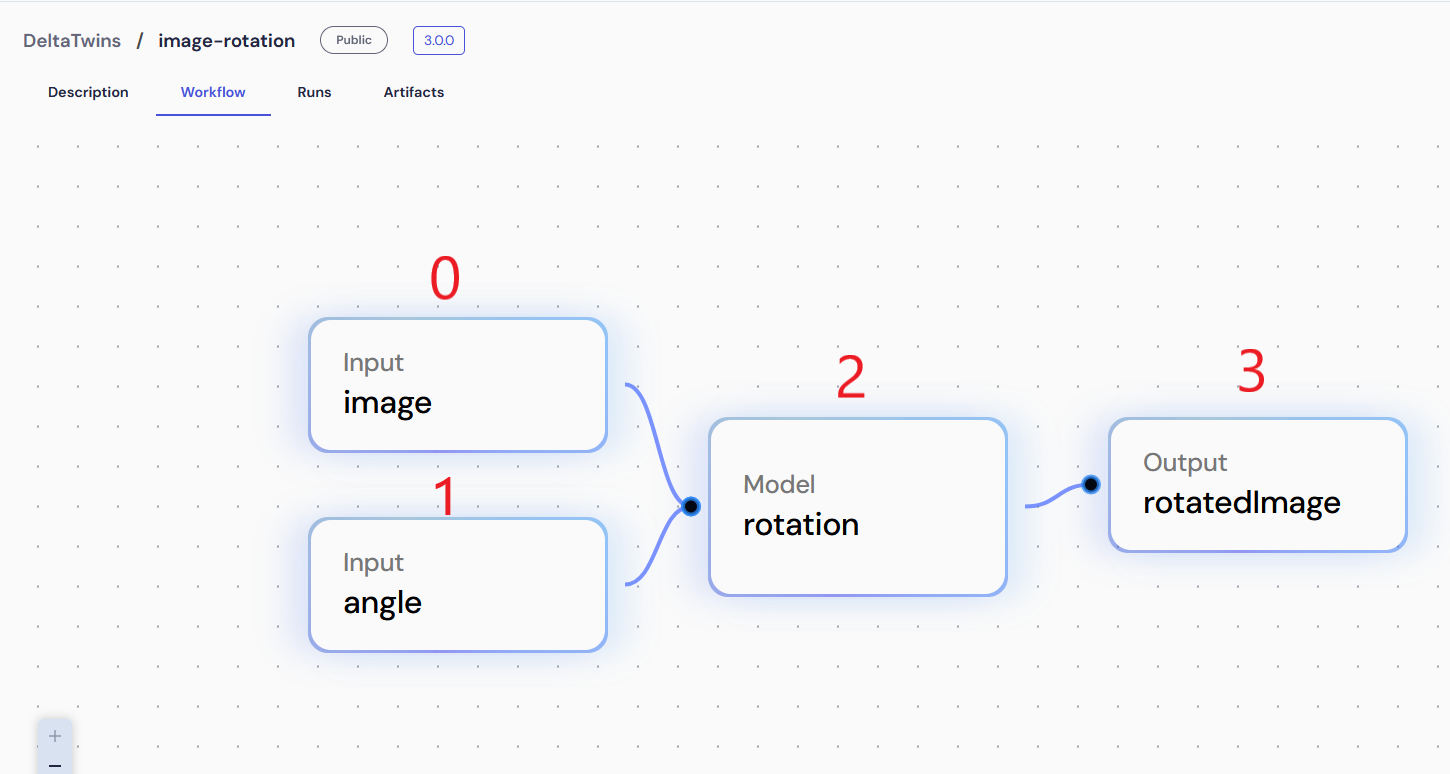
To proceed:
Edit the workflow.yml file
Reference each nodes
Reference each nodes (i.e. inputs, models and outputs name) of your workflow by specifying an id number and its reference.
nodes:
  - id: 0
    ref: inputs.image
  - id: 1
    ref: inputs.angle
  - id: 2
    ref: models.rotation
  - id: 3
    ref: outputs.rotatedImage
The reference provides the node status, whether it is an input, output or model, and its name within the workflow sheme.
Define for each edges, the source (from) and the destination (to)
Define for each edges, the source (from) and the destination (to) to describe the relationships between nodes as illustrated below :
edges:
  - from:
      id: 0
    to:
      id: 2
      port: img
  - from:
      id: 1
    to:
      id: 2
      port: angle
The property port is the name of the output/input for the destination node.
In our case, the rotation node has 2 inputs :
- the image (#0) referenced as
img - the angle (#1) referenced as
angle
An example workflow file is downloadable here (download).